Firmware Updates (OTA)
Update TCM and NMEA2000 WiFi Gateway firmware from the Accutroll app over Wi-Fi.
Table of contents
- Update video
- Which devices this covers
- Step 1: Start the update
- Step 2: Let the app finish
- Step 3: Confirm success
Update video
Which devices this covers
Over-the-air firmware updates apply to the TCM and the NMEA2000 WiFi Gateway.
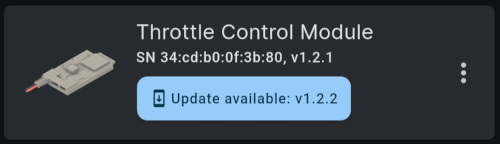
The app checks for updates and downloads them in the background every time you launch it. If a device is behind, its tile shows Update available.
Step 1: Start the update
- Tap Update available on the device tile
- Confirm Update
Step 2: Let the app finish
The app connects to the device, uploads the firmware image, commands a reset, reconnects, and sanity-checks the result. This takes a couple of minutes.
Keep the app open and the device powered until the success message.
Step 3: Confirm success
When the update finishes you should see Update success. The Update available badge is gone. Verify the new firmware in Settings → About.
If an update fails, perform a factory reset and try the update again.
Need Help?
- Email Support: support@accutroll.com
- Contact Form: accutroll.com/pages/contact