Linking Accutroll Devices
How to put the TCM and NMEA2000 WiFi Gateway on the same Wi-Fi network and enable speed feedback for cruise control.
Table of contents
- Videos
- What “linked” means
- Happy path: let the app link
- Manual recovery if you tapped Skip
- Enable the NMEA 2000 gateway client
- Last resort
- Next Steps
Videos
Happy-path install (link while adding the second device):
What “linked” means
Cruise control needs both:
- The TCM and gateway on the same Wi-Fi network
- The TCM NMEA 2000 gateway client enabled
Out of the box, each Accutroll device is its own Wi-Fi access point. They work independently until you link them.
Devices grouped under one heading in the app (you can rename that heading, for example to your boat name) are on the same network. That is still not enough for speed. You must also enable the gateway client on the TCM.
Happy path: let the app link
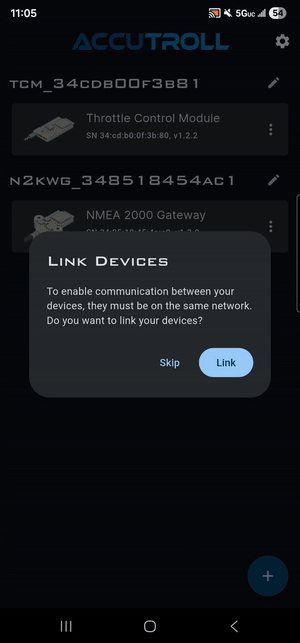
When you add the second device, allow the app to link.
- Save the second device profile when prompted.
- When the app asks you to configure device networks, do not tap Skip.
- Prefer selecting the NMEA2000 gateway as the Wi-Fi access point. That takes routing burden off the TCM.
- Wait while the app updates settings, reboots the joining device, and rediscovers both units.
See the Installation Guide for the full add-device sequence.
Manual recovery if you tapped Skip
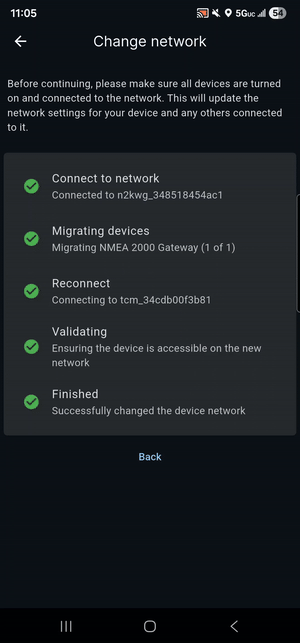
If you skipped linking, recover from the device list:
- Tap ⋯ on the gateway tile.
- Tap Change network.
- Select the TCM (the first bubble).
- Wait. The app sets the gateway to join the TCM, reboots, and rediscovers the devices.
Enable the NMEA 2000 gateway client
The speed panel does not appear at the bottom of the TCM user interface until the client is enabled.
- From the device list, tap the TCM tile.
- Open Settings → NMEA 2000 Gateway settings.
- Enable the client.
- Tap Scan, tap the gateway address, then Apply.
- Leave port 2000.
- Set Speed source:
- Paddle wheel for speed through water (STW)
- Speed over ground for GPS speed from an MFD, dedicated GPS, or autopilot
If the speed panel is still missing, see No Speed Feedback / Cruise Unavailable.
Last resort
Factory reset both devices, scan them into the app again, and let the app complete linking. See How to Factory Reset Accutroll Devices.
Next Steps
- NMEA2000 WiFi Gateway Installation Guide
- Building an NMEA2000 Backbone
- No Speed Feedback / Cruise Unavailable
Need Help?
- Email Support: support@accutroll.com
- Contact Form: accutroll.com/pages/contact